
Table of Contents
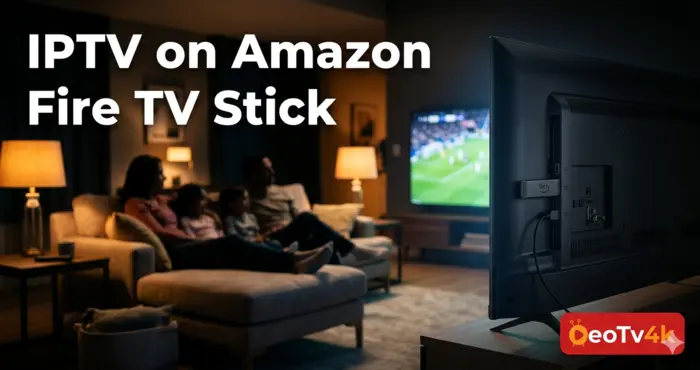
If you want to watch live TV, sports, and movies on your Fire TV Stick using IPTV, you are in the right place. This guide walks you through two of the best apps available in 2026, IBO PRO Player and IPTV Smarters Pro, with clear step-by-step instructions that work even if you have never done this before. By the end, you will have a fully working IPTV on Amazon Fire TV Stick setup.
The Amazon Fire TV Stick is one of the most popular streaming devices in the United States, and for good reason. It is affordable, easy to use, and fully compatible with IPTV apps. Whether you plug it into your living room TV or take it on a trip, it delivers the same smooth experience every time.
Why the Amazon Fire TV Stick Is Perfect for IPTV in 2026
Most smart TVs come with a fixed app store and limited flexibility. The Fire TV Stick runs a modified version of Android, which means it can install apps that are not officially listed in the Amazon App Store. That opens the door to a wide range of IPTV players without any technical knowledge required.
It also handles 4K streaming without breaking a sweat, supports Wi-Fi 5 and 6, and fits in a coat pocket. For anyone exploring best IPTV services in 2026, setting up IPTV on Amazon Fire TV Stick is one of the smartest starting points.
What You Need Before You Start
Before jumping into the installation steps, make sure you have these three things ready.
A stable internet connection with at least 25 Mbps for HD streaming. An active IPTV subscription with your login credentials or MAC address. A Fire TV Stick that is already set up and connected to your TV.
Three Ways to Connect Your IPTV Subscription
Most IPTV providers support one or more of these connection methods. Knowing which one your provider uses will save you time during setup.
| Connection Method | How It Works | Best For |
|---|---|---|
| URL M3U | Paste a playlist link into the app | Quick setup, most providers |
| Xtream Codes API | Enter server address, username, password | Full VOD and EPG support |
| MAC Address Activation | Send your device MAC to your provider | Beginners, automatic setup |
IBO PRO Player uses MAC address activation, which is the simplest method. IPTV Smarters Pro works with both M3U and Xtream Codes.
How to Install IBO PRO Player on Your Fire TV Stick
IBO PRO is a clean, reliable app that is especially popular with users who want a simple, set-it-and-forget-it experience. The whole process takes under ten minutes.
Step 1 — Install the Downloader App
Downloader is a free tool available directly in the Amazon App Store. It lets you download files and apps that are not listed there officially, which is essential when configuring IPTV on Amazon Fire TV Stick.
- From your Fire Stick home screen, press the search icon in the top left corner.
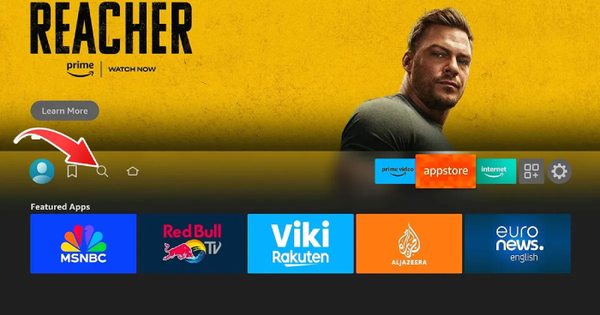
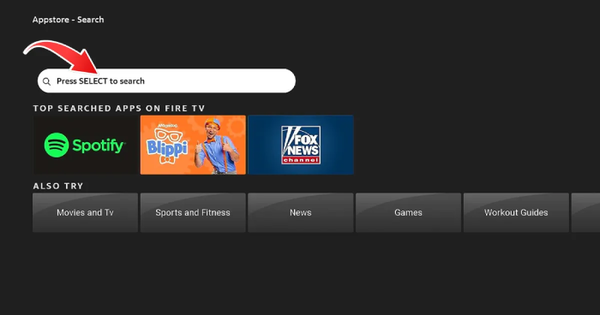
2. Type “Downloader” and select it from the results.
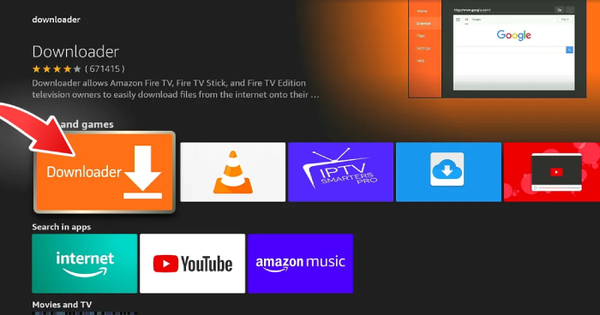
3. Press Download and wait for the installation to finish.
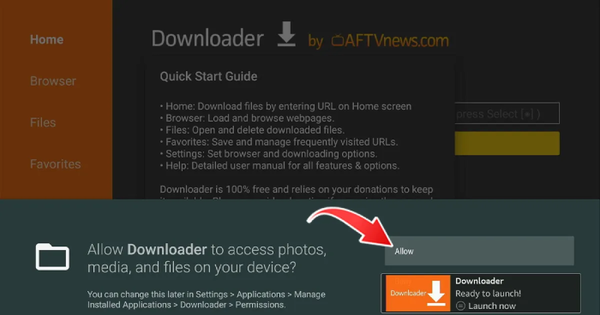
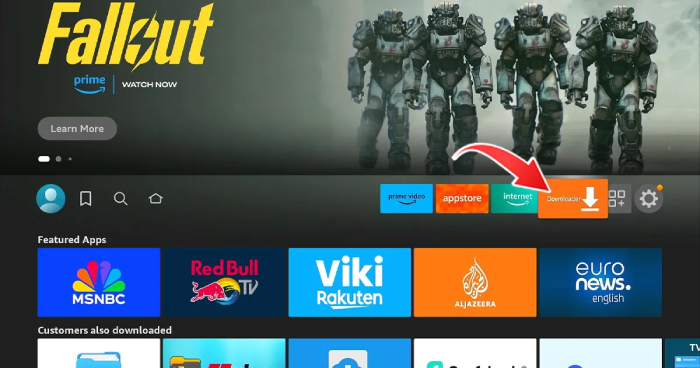
4. Return to the home screen. You will see the orange Downloader icon in your apps list.
Step 2 — Enable Apps from Unknown Sources
By default, the Fire Stick only allows apps from Amazon. You need to unlock this setting once before installing any third-party app.
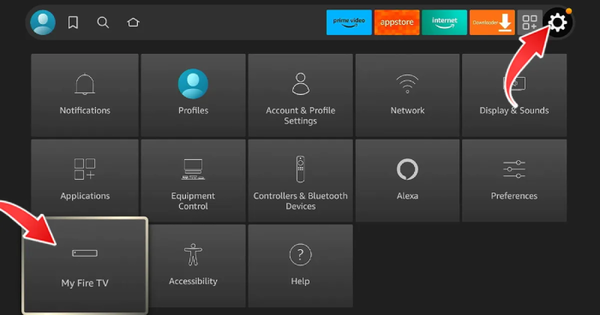
- Go to Settings, then select My Fire TV.
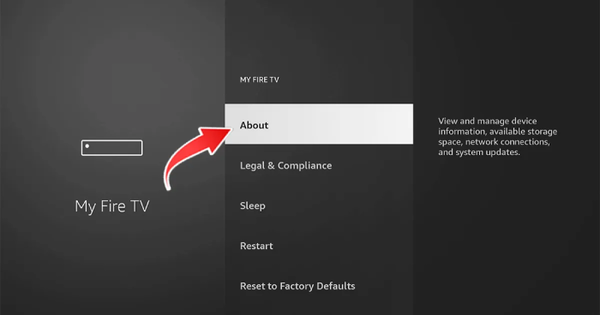
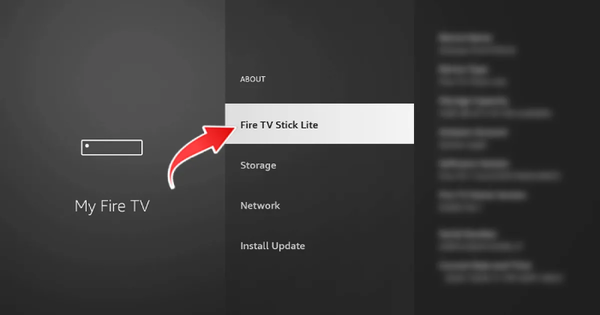
2. Open About and tap the Fire TV Stick option seven times to unlock Developer Options.
3. Press Back, then open Developer Options.
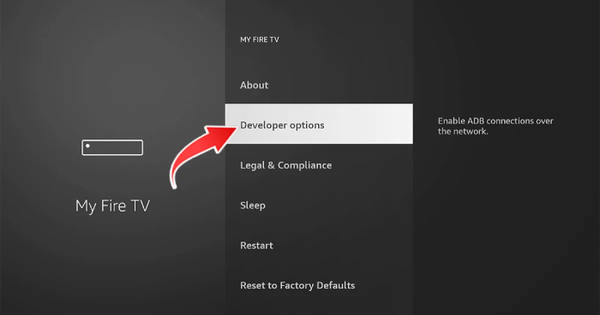
4. Select Install Unknown Apps.
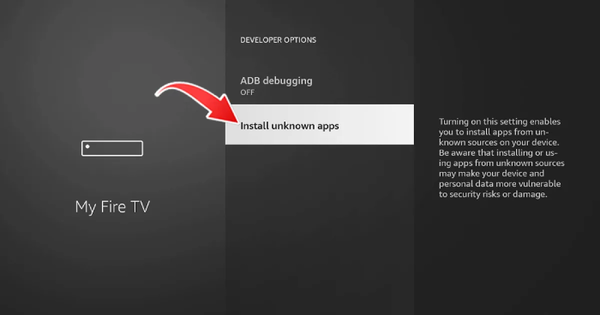
5. Find Downloader in the list and switch it to On.
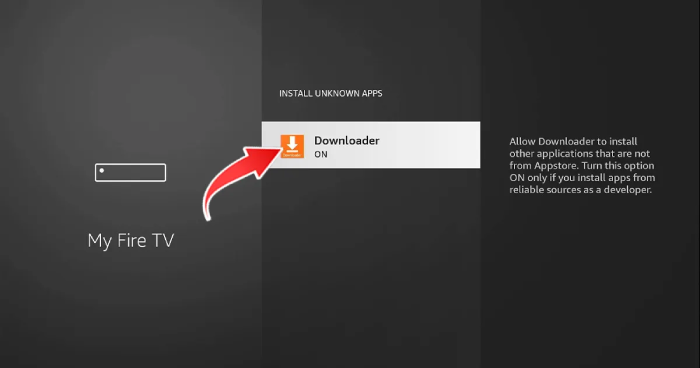
This is a standard and safe procedure. It only allows Downloader to install files, nothing else on your device is affected.
Step 3 — Download and Activate IBO PRO Player
- Open Downloader and click on the URL bar at the top.
2. Type the code 834339 and press Go. The download will begin automatically.
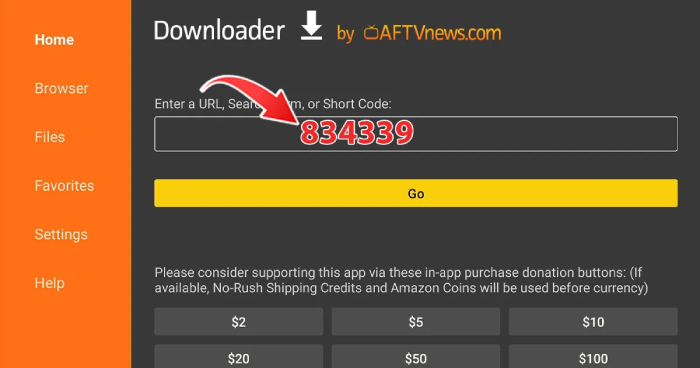
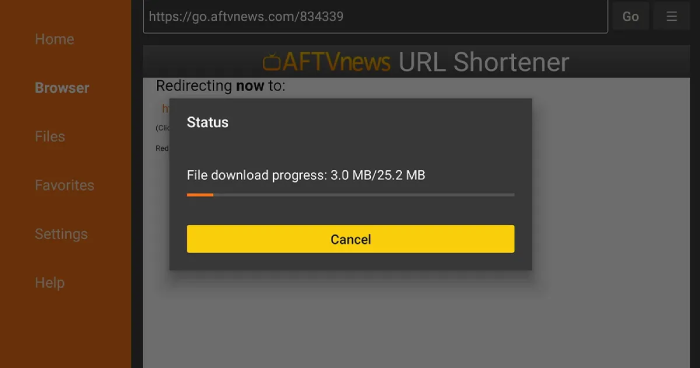
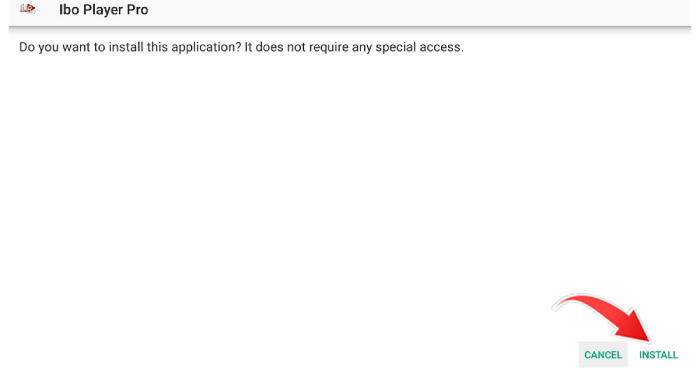
3. When the download is complete, press Install.
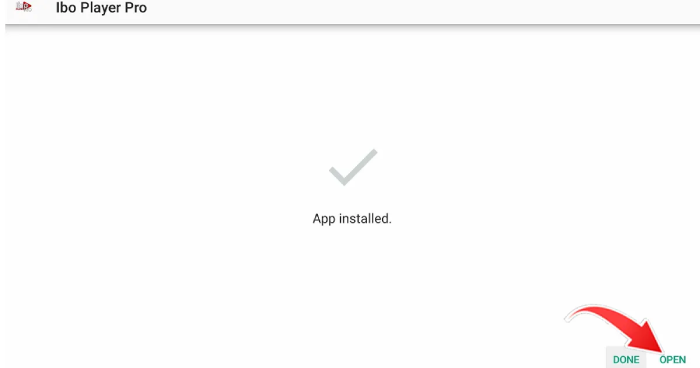
4. Once installed, open IBO PRO Player.
4. The app will show you a unique MAC address and activation key. Take a screenshot or write them down.

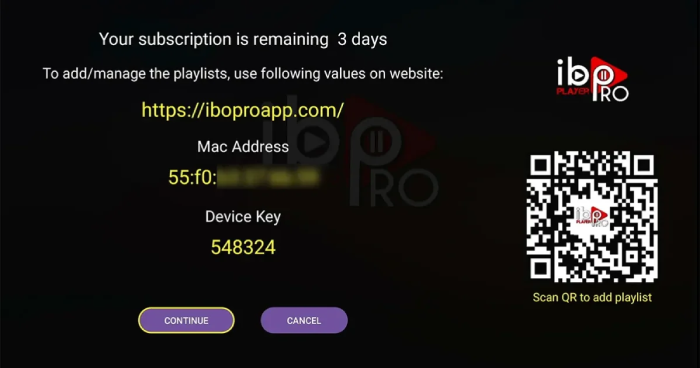
5. Send this information to your IPTV provider via WhatsApp, email, or support chat.
6. Wait for your provider to confirm activation.
7. Close the app completely, then reopen it.
8. Your channels will load automatically. Enjoy your new IPTV on Amazon Fire TV Stick streaming experience.
How to Install IPTV Smarters Pro on Fire TV Stick
IPTV Smarters Pro offers a more modern interface and works well for users who want more control over their setup. It is not available in the Amazon App Store, so you install it manually using Downloader, which you already have from the previous steps.
Getting the APK File with Downloader
- Open Downloader and tap the URL bar.
- Enter this address: https://www.iptvsmarters.com/smarters.apk
- Press Go and wait for the download to complete.
- When prompted, press Install and then Open.
Connecting Your IPTV Account
- Accept the terms of service when the app opens.
- Choose your preferred login method, either M3U URL or Xtream Codes.
- If using M3U, paste the link your provider sent you into the playlist field.
- If using Xtream Codes, enter the server address, username, and password from your provider.
- Press Add User or Connect. The app will load all your channels and content.
Once connected, you will have access to live channels, on-demand movies, TV shows, and an electronic program guide, all organized and easy to browse through your IPTV on Amazon Fire TV Stick setup.
IBO PRO Player vs IPTV Smarters Pro — Which One Should You Pick?
Both apps deliver a solid experience with a quality IPTV subscription. The difference comes down to how much setup you want to handle and what kind of interface you prefer.
Quick Comparison Table
| Feature | IBO PRO Player | IPTV Smarters Pro |
|---|---|---|
| Installation method | Downloader code | APK via URL |
| Connection type | MAC address activation | M3U or Xtream Codes |
| Interface style | Classic TV layout | Modern, app-style navigation |
| Built-in EPG | Yes | Yes |
| VOD support | Yes | Yes |
| Fire Stick performance | Excellent | Very good |
| App cost | Paid (often included by provider) | Free APK |
Best Choice by User Type
If you are new to IPTV on Amazon Fire TV Stick, a retiree setting up streaming for the first time, or someone who just wants things to work without fuss, go with IBO PRO Player. The MAC activation means your provider does the configuration for you.
If you are comfortable with a bit more setup and want a modern interface with customization options, IPTV Smarters Pro is the better fit. It also suits users who travel frequently, since M3U links and Xtream credentials work from any location.
NeoTv4k supports both apps and offers a free trial so you can test everything before committing to a plan.
Both applications offer a premium experience when streaming IPTV on Amazon Fire TV Stick.
Troubleshooting Common IPTV Issues on Fire TV Stick
Even with a solid IPTV on Amazon Fire TV Stick setup, the occasional issue can pop up. Here are the most common problems and how to fix them quickly.
Buffering and Freezing
This almost always points to your internet connection rather than the app itself. If you notice buffering while watching IPTV on Amazon Fire TV Stick, switch your device from 2.4 GHz Wi-Fi to the 5 GHz band in your router settings.
Channels Not Loading After Activation
If your provider confirmed activation but your channels are not showing, the most common fix is a full restart. Press and hold the home button on your remote, select App Settings, then Force Stop the app. Relaunch it fresh. If the problem continues, contact your provider to confirm the activation was applied to the correct MAC address.
App Crashes on Launch
Go to Settings, then Applications, find your IPTV app, and select Clear Cache and Clear Data. This resets the app without uninstalling it. If it still crashes, uninstall the app and reinstall it using the same IPTV on Amazon Fire TV Stick installation steps above.
Frequently Asked Questions
Does IPTV work well on the Amazon Fire TV Stick?
Yes. Setting up IPTV on Amazon Fire TV Stick is highly recommended in 2026. With a stable internet connection and a quality subscription, you can stream HD and 4K content without interruption.
What internet speed do I need for IPTV on Fire Stick?
A minimum of 15 Mbps is recommended for HD streaming. For 4K content or multiple simultaneous streams in your home, aim for 50 Mbps or higher.
Can I install IPTV Smarters Pro from the Amazon App Store?
No. IPTV Smarters Pro is not listed in the Amazon App Store. You install it by downloading the APK file through the Downloader app, which takes less than five minutes following the steps in this guide.
What is the difference between M3U and Xtream Codes?
An M3U URL is a playlist link that loads your channels directly. Xtream Codes uses a server address with a username and password, and typically provides better access to VOD libraries and program guides. Both work with IPTV Smarters Pro.
Is MAC address activation safe?
Yes. Your MAC address is simply a unique identifier for your device. Sharing it with your IPTV provider is standard practice and carries no security risk.
Which Fire Stick model works best for IPTV?
For the best experience in 2026, the Fire TV Stick 4K Max offers the most processing power and the smoothest performance with demanding IPTV on Amazon Fire TV Stick streams.
Can I use my Fire Stick for IPTV while traveling?
Absolutely. Your Fire Stick and IPTV subscription work from any location with a reliable internet connection, whether you are using IPTV on Amazon Fire TV Stick in a hotel, a vacation rental, or visiting family across the country.
Final Thoughts and Next Step
Setting up IPTV on your Amazon Fire TV Stick is genuinely straightforward once you follow the right steps. IBO PRO Player and IPTV Smarters Pro are both excellent choices in 2026, and the best one depends on how you like to manage your viewing experience.
If you are looking for reliable IPTV services with broad channel coverage, on-demand content, and consistent performance, NeoTv4k is worth checking out. You can start with a free trial to test the quality across both apps before choosing a plan, no commitment required.
Take ten minutes tonight, follow the steps above, and your Fire Stick will feel like a completely different device by the time the evening news starts.