

Table of Contents
Setting up IPTV on MAG Box is one of the simplest ways to replace cable TV in your home. You plug it in, enter a portal URL from your provider, and your channels load automatically.
No app installs, no complicated menus. This guide walks you through every step, including finding your MAC address, fixing common issues, and choosing the right IPTV plan for your household.
What Is a MAG Box and Why American Streamers Love It
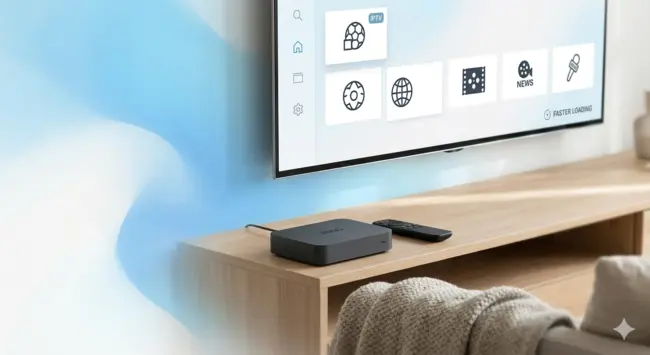
Think of the MAG Box as a dedicated IPTV decoder. It looks and feels like the set-top box your cable company used to send you, except it runs entirely over your home internet connection. No satellite dish, no coaxial cable, no monthly equipment rental.
What makes it stand out from other streaming gadgets is its simplicity. There are no app stores to browse, no accounts to create, and no software updates interrupting your evening. You enter one URL, and the box does the rest.
That focused design is exactly why cord-cutters across the country are choosing it. Whether you are in a suburb outside Chicago or a rural area in Texas with limited cable options, as long as you have a decent internet connection, streaming IPTV on MAG Box works perfectly.
How It Compares to Other Streaming Devices
Most popular streaming sticks and Android boxes are built for general entertainment. They handle apps, games, and multiple accounts. That flexibility comes with trade-offs: slower menus, more settings to manage, and occasional compatibility issues with certain IPTV providers.
The MAG Box does one thing and does it very well. It is optimized from the ground up for portal-based streaming, which means IPTV on MAG Box offers faster channel loading, more stable streams, and a cleaner viewing experience overall.
Who Should Consider a MAG Box in 2026
Choosing IPTV on MAG Box is a strong choice for anyone who wants a TV experience that feels familiar but costs a fraction of a traditional cable subscription.
It works particularly well for households that prefer a remote-and-couch setup over navigating a smartphone or laptop to watch live TV.
If anyone in your home has ever said “I just want to turn on the TV and watch,” this device was built for them.
Everything You Need Before You Start
Getting set up takes less than 20 minutes if you have the right things ready. Run through this checklist before you touch any settings.
| Item | Details | Ready? |
|---|---|---|
| MAG Box (powered on) | Connected to your TV via HDMI cable | ✔ |
| Internet connection | Wi-Fi or Ethernet, 10 Mbps minimum recommended | ✔ |
| Active IPTV subscription | Or a free trial from NeoTv4k | ✔ |
| Portal URL | Sent by your provider after account activation | ✔ |
| MAC address | Found on the device label or in system settings | ✔ |
Hardware and Connection Requirements
A wired Ethernet connection will always outperform Wi-Fi for IPTV on MAG Box. If your device is near your router, connecting it with a short Ethernet cable eliminates most buffering issues before they start.
For households streaming in HD or 4K, aim for at least 25 Mbps of dedicated bandwidth. If multiple people are streaming on different devices at the same time, your connection should comfortably handle that combined load.
What Your IPTV Provider Will Send You
After you sign up or start a free trial, your provider will send you two things: a portal URL and confirmation that your MAC address has been activated. Some providers send these via email, others through WhatsApp or a support chat. Keep that information handy before you open the settings menu on your MAG Box.
How to Set Up IPTV on MAG Box: Step-by-Step
This process is straightforward. Follow the steps in order and your channels will be live within minutes.
- Power on your MAG Box and wait for the home screen to appear fully. This usually takes 15 to 30 seconds.
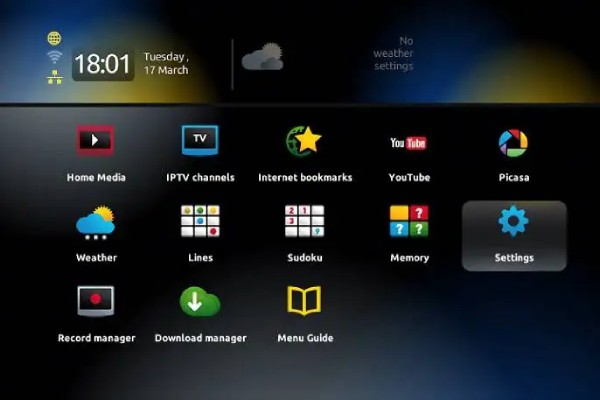
2. Press the Setup button on your remote, or navigate to the main menu and look for System Settings. The exact label depends on your firmware version.
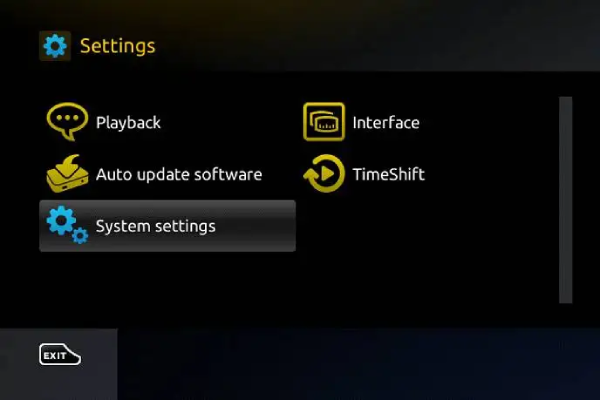
3. Inside the settings menu, locate the option labeled Portal or Portal URL. This is where you will type the address your provider gave you. Enter it exactly as written, with no extra spaces or character changes.
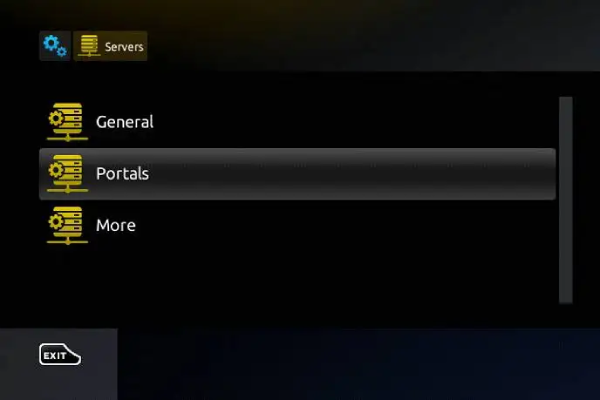
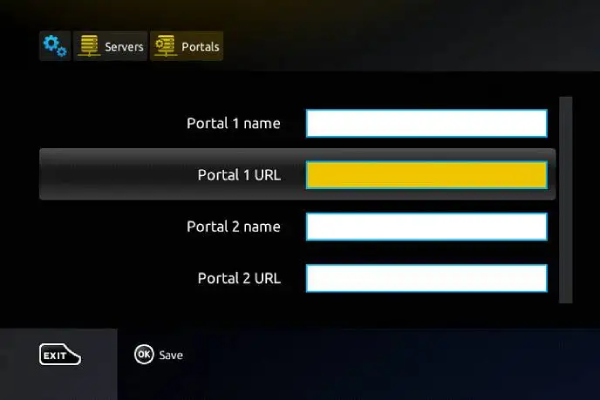
4. Confirm the entry and exit the settings menu. Your MAG Box will either restart automatically or prompt you to do so manually. Let it reboot completely.
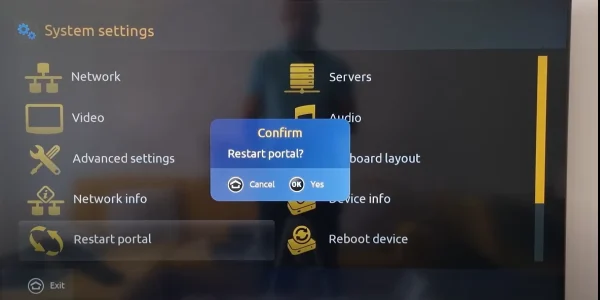
5. Once the device comes back on, it will attempt to connect to your provider’s portal. If your MAC address has been activated on their end, your channel list will load within a few seconds.
6. Browse your channels, check the EPG (electronic program guide) if your provider includes one, and enjoy. Your IPTV on MAG Box setup is complete.
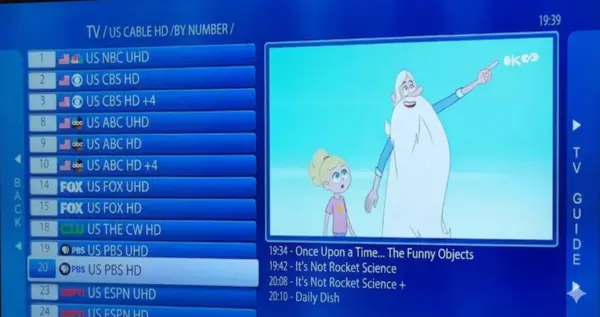
If the portal screen does not load on the first try, wait 30 seconds and restart the device one more time. Servers occasionally need a brief moment to recognize a new activation.
How to Find Your MAG Box MAC Address
Your MAC address is the unique hardware identifier that tells your provider exactly which device to activate your subscription on. Without it, your portal for IPTV on MAG Box will not work, no matter how correctly you enter the URL. Every device used for IPTV on MAG Box has a label on its underside or back panel.
Every MAG Box has a label on its underside or back panel. The address printed there starts with 00:1A:79 followed by a unique set of characters. Take a photo of it with your phone to avoid transcription errors when you send it to your provider.
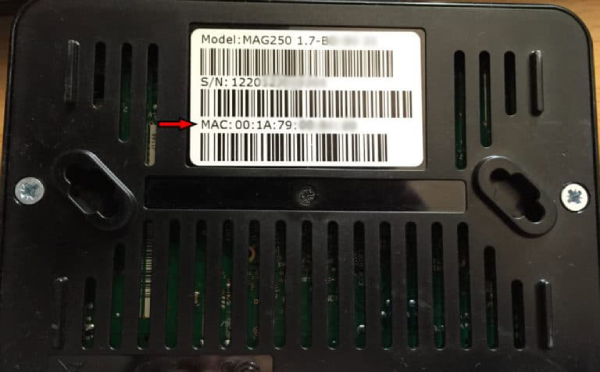
If you prefer to pull it from the device menu directly, here is how:
- Power on the MAG Box and let the home screen load.
- Go to System Settings, then find Device Information or a similar option.
- Look for the line that reads MAC Address. It will display a 12-character string formatted like 00:1A:79:XX:XX:XX.
- Photograph the screen or write it down carefully.
- Send it to your IPTV provider through WhatsApp, email, or their support chat, depending on what they offer.
- Once they confirm activation on their side, restart your MAG Box and the portal will load with your full channel lineup.
Method 1: Check the Device Label
This is the fastest option. Flip the box over, find the sticker, and send that number to your provider. Done.
Method 2: Find It in the System Menu
Use this method if the sticker on your unit is worn or missing. The MAC address displayed in the menu is always current and accurate.
Common Problems and How to Fix Them
Even with a clean setup, occasional issues come up. Most have simple solutions that take under two minutes.
| Problem | Likely Cause | Fix |
|---|---|---|
| Portal screen does not load | URL typo or MAC not yet activated | Double-check the URL and contact your provider |
| Black screen after restart | Unstable internet or server maintenance | Restart the MAG Box and your router |
| Channels freeze or buffer | Slow connection or weak Wi-Fi signal | Switch to Ethernet if possible |
| Specific channels will not open | Those streams are temporarily offline | Wait a few minutes and try again |
| Authorization error message | Subscription lapsed or MAC address changed | Reach out to your provider’s support team |
One situation that catches many users off guard: if you replace your MAG Box or buy a used one, the new device has a different MAC address. Your provider must activate that new address separately. It does not carry over automatically, so contact them before assuming the device is broken.
Is a MAG Box Right for You?
The MAG Box fits several different types of American households, and for each one, the experience is a little different.
The Busy Family
You want cartoons, local news, sports, and a movie queue available the moment someone picks up the remote. Running IPTV on MAG Box handles all of that from one device, with a simple interface that kids and adults can both navigate without calling for help.
The Sports Fan
Sunday afternoons, playoff weekends, March Madness. With the best IPTV services loaded on your device, you get access to IPTV on MAG Box sports coverage without paying for a bloated cable bundle.
The Traveler or Snowbird
Spending winter in Florida or Arizona? Tuck your MAG Box into your suitcase. Plug it in at your rental, connect to the Wi-Fi, enter your portal URL, and your home channel lineup reappears exactly as you left it. Domestic travel, international trips, extended stays, it all works the same way.
The Cord-Cutter
You have already cancelled the cable subscription and you are looking for a clean, reliable replacement that does not require managing a dozen different apps. The MAG Box paired with a solid IPTV subscription is a direct swap, often at a fraction of the monthly cost.
MAG Box vs Other IPTV Devices: Quick Comparison
Choosing the right device comes down to how you plan to use it and what kind of setup experience you want.
| Device Type | Setup Method | Best For | Ease of Use | Buffering Risk |
|---|---|---|---|---|
| MAG Box | Portal URL | Dedicated IPTV users | Very Easy | Low (Ethernet) |
| Android TV Box | App-based | Tech-savvy users wanting flexibility | Moderate | Moderate |
| Smart TV (built-in) | App install | Minimal hardware setups | Easy | Moderate |
| Amazon Fire Stick | Sideload or app | Budget-friendly cord-cutters | Moderate | Moderate |
| Smartphone or Tablet | App-based | On-the-go viewing | Easy | Varies |
The MAG Box wins on stability and simplicity. Other devices offer more features, but those features come with more things that can go wrong. For pure IPTV performance, especially in a living room setup where someone just wants to watch TV, the MAG Box holds its own against anything on the market in 2026.
If you are exploring your options, NeoTv4k offers access across multiple device types, so you are not locked into one setup. Their team can walk you through which configuration works best for your home.
FAQs About IPTV on MAG Box
Do I need a cable or satellite subscription to use a MAG Box?
No. The MAG Box works entirely over your home internet connection. A broadband connection and an active IPTV subscription are all you need. There is no need for any additional TV service.
Will IPTV on MAG Box work anywhere in the United States?
Yes. Whether you are in New York, rural Montana, or a vacation rental in Miami, the MAG Box functions the same way as long as you have a stable internet connection. Many American expats and frequent travelers also use it abroad.
How long does the full setup process take?
Most users complete the setup in 10 to 20 minutes. Finding your MAC address, entering the portal URL, and waiting for activation by your provider are the main steps. If your provider responds quickly, you could be watching live TV in under half an hour.
What happens if I switch IPTV providers later?
Switching is simple. Go back into your MAG Box settings, replace the old portal URL with the new one, and send your MAC address to the new provider for activation. The whole process takes about five minutes.
Can I use my MAG Box on more than one TV?
Each MAG Box is tied to one MAC address, so it connects to one TV at a time. For a second TV, you would need a second device. Many IPTV providers, including NeoTv4k, offer multi-connection plans that cover several devices under one subscription.
Is 4K streaming available on a MAG Box?
Newer MAG Box models support 4K streaming. The quality you get depends on your internet speed and the resolution of the streams your provider carries. With a fiber or high-speed cable connection, 4K performance on supported models is smooth and consistent.
What should I do if my MAG Box keeps freezing mid-stream?
The most effective fix is switching from Wi-Fi to a wired Ethernet connection. If that is not possible, move your router closer to the device or use a Wi-Fi extender. Persistent buffering on a strong connection may indicate a server issue on your provider’s side, so checking in with support is always worth a quick message.
Ready to Watch? Start With a Free Trial
The MAG Box is one of the most reliable ways to experience live IPTV in an American home. The setup is fast, the interface is clean, and once it is configured, you rarely need to touch it again.
If you are still deciding whether IPTV is the right move for your household, NeoTv4k makes that decision easy. They offer a free trial so you can connect your MAG Box, browse the full channel lineup, test the stream quality on your actual connection, and decide with no pressure and no commitment.
Explore your options and discover why so many American households are switching. Visit NeoTv4k to get started with a free trial today, and see what genuine IPTV services 2026 looks like when it is done right.