Table of Contents
If you’re tired of paying too much for cable and missing your favorite shows while you’re on the go, setting up IPTV on your Android phone is one of the smartest moves you can make in 2026. This guide walks you through everything, from picking the right app to getting your channels live in minutes, no technician needed, no complicated equipment.
Why More Americans Are Watching IPTV on Android Phones in 2026
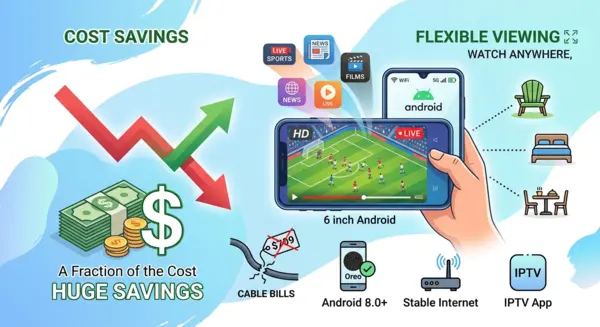
Cable bills in the US have been climbing for years. The average American household now spends well over $100 a month on traditional TV packages, often for hundreds of channels they never watch. IPTV services flip that model entirely, giving you more content, more flexibility, and a fraction of the cost.
Android phones have become the go-to screen for millions of people outside the living room. Whether you’re watching a Sunday afternoon game from the backyard, catching a late-night show in bed, or streaming live news during your lunch break, your phone is always with you. It makes sense to use it.
The Real Cost Difference Between Cable and IPTV Services
A standard cable subscription in the US runs anywhere from $80 to $180 per month depending on your provider and package. A quality IPTV subscription typically costs a small fraction of that, with access to thousands of live channels, sports, and on-demand content included.
The savings over a single year are significant. Over two or three years, the difference becomes impossible to ignore, especially when the picture quality and channel variety are just as good, often better.
What Makes Android the Best Device for IPTV Streaming
Android is the most widely used mobile operating system in the world, and IPTV app developers know it. Nearly every major IPTV application is built with Android as the primary platform, which means you get the best compatibility, the most frequent updates, and the widest choice of apps.
Modern Android phones also have stunning displays. Watching sports in HD on a 6-inch screen with earbuds in is a genuinely great experience, especially when you’re away from your TV.
What You Need Before Setting Up IPTV on Android Phone
Getting started is simple, but a few quick checks will save you frustration later.
- An Android phone running Android 8.0 or newer (most phones sold after 2018 qualify)
- A stable internet connection, either home WiFi or a solid mobile data plan
- An active IPTV subscription or a free trial to get started
Android Version and Device Requirements
Android 8.0 covers the vast majority of phones in use today. If your phone is from 2018 or later, you’re almost certainly good to go. Older devices may still work with lighter apps, but the experience will be smoother on newer hardware.
You don’t need a flagship phone either. Mid-range Android devices from major brands handle IPTV streaming without any issues, as long as the internet connection is solid.
Internet Speed: What’s Enough for Mobile IPTV?
Connection speed is the single biggest factor in your streaming quality. The good news is that you don’t need a fiber connection to enjoy great IPTV on your phone.
Speed Requirements by Quality
| Stream Quality | Minimum Speed | Recommended Speed |
|---|---|---|
| Standard Definition | 5 Mbps | 8 Mbps |
| HD (720p) | 10 Mbps | 15 Mbps |
| Full HD (1080p) | 15 Mbps | 25 Mbps |
| 4K Ultra HD | 25 Mbps | 40 Mbps+ |
On home WiFi, most Americans have more than enough speed for Full HD streaming. On mobile data, a 4G LTE or 5G connection handles HD and Full HD easily. Just keep an eye on your monthly data cap if your plan isn’t unlimited, since one hour of HD streaming can use between 1 and 3 GB.
Best IPTV Apps for Android Phones in 2026
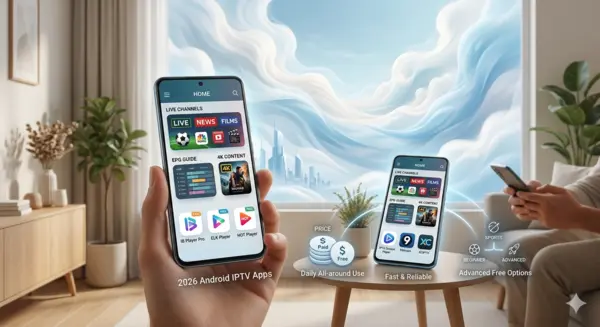
Choosing the right app makes a big difference in your day-to-day experience. There are dozens of options out there, so here’s an honest breakdown of what actually works well in 2026.
Paid IPTV Apps Worth Every Dollar
IB Player Pro
IB Player Pro is consistently one of the top choices among IPTV users on Android. Its interface is clean and easy to navigate, the electronic program guide works reliably, and it handles HD and 4K streams without stuttering. If you want something that feels polished and stable from day one, this is a strong pick.
ELK Player
ELK Player is lightweight and fast. It launches quickly, loads channels without noticeable delay, and works well even on older Android devices. If you want something no-fuss that just works, ELK Player delivers that experience consistently.
HOT Player
HOT Player is built for people who watch a lot of live sports. It handles high-definition streams smoothly, offers solid customization options, and the channel navigation is straightforward. Picture quality during live events is one of its strongest points.
Free IPTV Apps That Actually Work
IPTV Stream Player
One of the most popular free options, IPTV Stream Player supports both M3U links and Xtream Codes login. The interface is simple enough for complete beginners, and setup takes just a couple of minutes.
9Xtream
9Xtream keeps things minimal. You log in with your credentials, your channels load, and you start watching. It’s a great starting point for anyone trying IPTV for the first time without wanting to invest in a paid app right away.
XCIPTV
XCIPTV is the most feature-rich of the free options. It offers a modern interface, full EPG support, and reliable performance. Many users who start here never feel the need to upgrade to a paid app.
App Comparison Table
| App | Price | Interface | EPG Support | Max Quality | Best For |
|---|---|---|---|---|---|
| IB Player Pro | Paid | Excellent | Full | 4K | Daily all-around use |
| ELK Player | Paid | Clean | Basic | HD | Older devices |
| HOT Player | Paid | Good | Full | 4K | Live sports fans |
| IPTV Stream Player | Free | Simple | Basic | HD | Beginners |
| 9Xtream | Free | Minimal | Limited | HD | First-time users |
| XCIPTV | Free | Modern | Full | 4K | Advanced free users |
How to Install IPTV on Android Phone — Step by Step
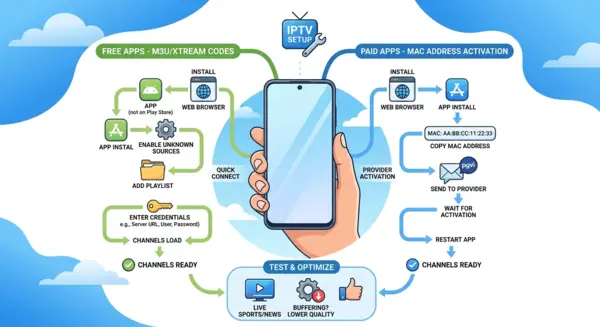
Now that you’ve picked your app, here’s exactly how to get everything running.
Step 1 — Choose Your App and Enable Unknown Sources
Most IPTV apps aren’t available on the Google Play Store, so you’ll need to allow installations from outside the store. This is a standard process and takes about 30 seconds.
- Open your phone’s Settings
- Go to Security or Privacy, depending on your Android version
- Find the option labeled “Install unknown apps” or “Unknown sources”
- Enable it for your browser or file manager
- Download your chosen app from the developer’s official website or directly from your IPTV provider
Step 2A — Free Apps: Connect via M3U or Xtream Codes
Once the app is installed and open, connecting your service is quick.
- Open the app and go to the Add Playlist or Login section
- Choose between M3U URL or Xtream Codes depending on what your provider gave you
- Enter your server URL, username, and password as provided
- Tap Connect or Load, and your channels will appear within seconds
Step 2B — Paid Apps: MAC Address Activation Method
Paid apps like IB Player Pro, ELK Player, and HOT Player use a MAC address activation system. Here’s how it works.
- Download and install the app on your Android phone
- Open it for the first time and note the unique MAC address displayed on screen, take a screenshot right away
- Send the MAC address and activation key (if shown) to your IPTV provider via WhatsApp, email, or support chat
- Wait for activation confirmation from your provider
- Close the app completely and restart it
- Your channels are now loaded and ready to watch
Step 3 — Test Your Channels and Optimize the Picture
- Browse through your channel list and check that your preferred live channels are available
- Test a live news channel and a live sports channel to check stability
- Watch for 10 to 15 minutes during evening hours, when network traffic is higher, to get a realistic sense of performance
- If you notice any buffering, try lowering the stream quality one step in the app settings
How the NeoTv4k Free Trial Works on Android
Not sure if IPTV is right for you? NeoTv4k offers a free trial so you can test the full service before committing to anything. No credit card required, no partial access, you get the complete experience from the moment you sign up.
What You Get During the Free Trial Period
During your trial, you’ll have access to the same channel lineup and stream quality as a paying subscriber. You can test it on your Android phone, on your TV, or on any other compatible device at the same time.
Use the trial to check how the service performs during a live game or a busy prime-time evening. That’s when real performance matters, and NeoTv4k holds up well under those conditions. Among the best IPTV services available to American users today, NeoTv4k stands out for its reliability and channel depth.
Common IPTV Issues on Android and How to Fix Them
Even the best setup can run into occasional hiccups. Here are the most common problems and how to solve them quickly.
Buffering and Freezing on Mobile
Buffering is almost always a connection issue, not a service issue. Try these fixes in order.
- Run a speed test to confirm your connection is fast enough
- On WiFi, move closer to your router or restart it
- On mobile data, check your signal strength and move to a better-covered spot
- Lower the stream quality in your app settings by one step
App Won’t Open or Channels Won’t Load
- Clear the app cache through your Android Settings, then relaunch
- Double-check your login credentials, a single mistyped character will block access
- For paid apps, confirm with your provider that your MAC address activation is still active
- Uninstall and reinstall the app if nothing else works
Audio Works but Video Is Black
This is usually a decoder conflict. It’s easy to fix.
- Go into your app’s video settings
- Find the decoder option and switch between hardware and software decoding
- One of the two will work correctly on your specific device
Quick Troubleshooting Table
| Problem | Most Likely Cause | Quick Fix |
|---|---|---|
| Buffering | Slow or unstable connection | Lower quality or move closer to router |
| Channels not loading | Wrong credentials | Re-enter login details carefully |
| App won’t launch | Cache corruption | Clear cache and restart |
| Black screen with audio | Decoder mismatch | Switch hardware/software decoder |
| Activation not working | MAC not sent correctly | Screenshot MAC and resend to provider |
FAQs — IPTV on Android Phone
Does IPTV work on all Android phones?
Most Android phones running version 8.0 or later are fully compatible. That covers nearly every device sold in the US since 2018. Older phones may still work with lighter apps, but performance will be better on newer hardware.
Can I use IPTV on mobile data instead of WiFi?
Yes. A 4G LTE or 5G connection handles HD and Full HD streaming without issues. If your data plan has a monthly cap, watch your usage since HD streaming uses 1 to 3 GB per hour. Yes. A 4G LTE or 5G connection handles HD and Full HD streaming without issues. If your data plan has a monthly cap, watch your usage since HD streaming uses 1 to 3 GB per hour.
What is the best free IPTV app for Android in 2026?
XCIPTV offers the best combination of features, stability, and interface quality among free Android apps. It supports full EPG and handles 4K streams, which most free apps don’t manage well.
How long does it take to set up IPTV on an Android phone?
For free apps using M3U or Xtream Codes, setup takes under five minutes. For paid apps using MAC address activation, plan for up to 30 minutes depending on how quickly your provider responds.
Is IPTV legal in the United States?
IPTV as a technology is completely legal. What matters is the content and whether your provider has the proper licensing for the channels they distribute. Always choose a reputable and transparent IPTV provider.
How do I get the NeoTv4k free trial on my Android phone?
Contact NeoTv4k directly through their website or WhatsApp support. You’ll receive your login credentials within minutes and can start testing immediately on your Android phone, no payment needed.
What should I do if my IPTV service is slow only in the evenings?
Evening slowdowns are usually caused by network congestion on your ISP’s end, not your IPTV provider. Try lowering stream quality during peak hours, or switch to a wired connection if you’re watching on a larger screen.
Conclusion — Your TV, Your Phone, Your Rules
Setting up IPTV on your Android phone in 2026 is genuinely straightforward. Pick the right app for your needs, follow the activation steps that match your app type, make sure your internet connection meets the speed requirements, and you’re watching in minutes.
For American users who are done overpaying for cable packages full of channels they never use, IPTV services offer a smarter, more flexible alternative. You get more content, better value, and the freedom to watch anywhere your phone goes.
If you haven’t tried it yet, start with the NeoTv4k free trial. No credit card, no commitment, just a real look at what modern IPTV services can do before you decide anything.