Table of Contents
If you are curious about IPTV but not ready to commit, an IPTV free trial is the smartest first step you can take. Most reputable providers offer 24 hours of full access so you can test picture quality, channel variety, and app performance before spending a single dollar. This guide walks you through exactly what to check, what to avoid, and how to make the most of every minute of your trial.
What Is an IPTV Free Trial and How Does It Work?
IPTV stands for Internet Protocol Television. Instead of receiving channels through a cable box or satellite dish, everything streams directly over your internet connection. That means hundreds of live channels, on-demand movies, and sports events delivered straight to your TV, phone, tablet, or streaming device.
An IPTV free trial gives you complete access to a provider’s service for a limited period, usually 24 to 48 hours, with no payment required upfront. It is the equivalent of test-driving a car before signing anything. You get the full experience, not a watered-down demo.
How Access Is Delivered During a Trial
Once your trial is activated, you typically receive a username and password, sometimes paired with an M3U link or Xtream Codes login. You enter those details into a compatible app on your preferred device, and the full channel list loads instantly. No installation fees, no waiting, no contracts.
Why Legitimate Providers Offer Free Trials
A confident provider has nothing to hide. Offering a free trial without asking for your card details is essentially saying, “Judge us on quality, not promises.” It is also a natural filter. If a service refuses to let you test before paying, that alone should raise a question or two.
If you are exploring reliable IPTV services with full international coverage, NeoTv4k offers a free trial so you can experience the service firsthand before making any decision.
5 Things You Must Check During Your 24-Hour IPTV Trial
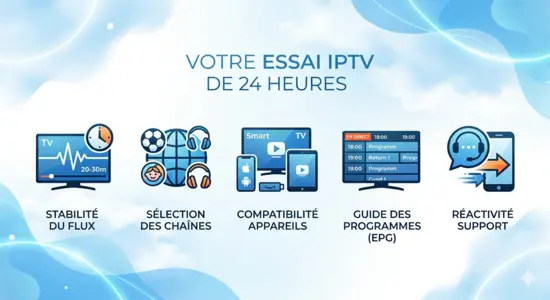
Testing IPTV properly takes more than pressing play and hoping for the best. There are five specific areas worth your attention if you want a clear picture of what you are signing up for.
1. Stream Stability and Picture Quality
This is the single most important factor. Watch your most-used channels for at least 20 to 30 minutes each, especially during evening hours when internet traffic peaks. Look for freezing, pixelation, or sudden drops in resolution. A small delay compared to traditional broadcast is normal. Constant buffering every few minutes is not.
2. Channel Selection and International Coverage
Count the channels that actually matter to your household. If you follow European football, check those feeds specifically. If you have kids at home, browse the family and children’s section. A large total channel number means nothing if the content your family watches daily is missing or unreliable.
3. Device Compatibility Across Your Home
Do not limit your test to one screen. Try the service on your smart TV, your phone, a tablet, and a streaming stick if you have one. Some providers perform beautifully on Android devices but struggle on Apple hardware, or the other way around. Testing every device during the trial saves you a nasty surprise later.
4. Electronic Program Guide (EPG) Quality
A solid EPG works like your familiar TV guide, showing what is on now and what is coming up next. During your trial, check whether the guide is accurate, up to date, and easy to navigate. A missing or broken EPG is a frustrating daily inconvenience that most people only notice after they have already subscribed.
5. Customer Support Responsiveness
Send a test message to the support team even if you have no real issue. Ask a simple question and time the response. A provider that answers quickly and clearly during a free trial will almost certainly treat paying customers the same way. Silence during a trial is a preview of silence when something actually goes wrong.
Common Mistakes People Make When Testing IPTV
Most people rush through a trial and miss the signals that would have saved them from a bad subscription. These are the most common mistakes worth avoiding.
Testing at the Wrong Time of Day
Streaming quality can vary significantly depending on when you test. If you only try the service at 10 in the morning on a Tuesday, you are seeing it under ideal, low-traffic conditions. Test on a Friday evening or during a major sports event. That is the real stress test, and it tells you far more about what daily life with that service actually looks like.
Only Checking One Device or One Content Type
Watching one live channel for ten minutes is not a thorough test. Mix it up. Try live sports, a movie on demand, a news channel, and something for the kids. Try it on at least two different devices. The more scenarios you cover, the more confident your final decision will be.
Ignoring Your Internet Speed Before Starting
IPTV performance depends heavily on your connection. For HD streaming you need a stable 15 to 20 Mbps. For 4K content, aim for 25 to 30 Mbps minimum. If your connection is borderline, some buffering may have nothing to do with the provider. Run a quick speed test before starting your trial so you know what you are working with.
How to Use Your 24-Hour IPTV Trial Smartly: A Step-by-Step Plan
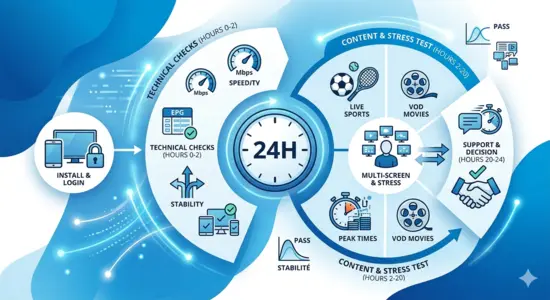
Having a loose plan for your trial hours means you cover all the important bases without running out of time.
First 2 Hours: Run the Technical Checks
- Install the recommended app on all your devices
- Log in using the credentials provided by the supplier
- Browse the full channel list and confirm your key categories are present
- Check that the EPG loads correctly and displays accurate information
- Note the interface speed, does it respond quickly when you change channels or navigate menus?
Hours 2 to 12: Explore the Content
This is the fun part. Watch a full episode of something, not just a few minutes. Tune into a live sports broadcast or a news channel during peak hours. If the provider includes on-demand content, browse it and test a full movie or series episode. Note anything that surprises you, good or bad.
Final Hours: Stress-Test the Service
- Run two devices simultaneously and check if quality drops
- Test during the evening when network load is highest
- Contact support with a question and measure response time
- Review your notes and decide whether the experience met your expectations
| Test Area | What to Look For | Pass Condition |
|---|---|---|
| Stream stability | No freezing or buffering | Smooth playback for 30+ minutes |
| Channel range | Covers your key content categories | All priority channels present |
| EPG accuracy | Guide matches actual broadcast | Up to date and easy to read |
| Multi-device use | No quality drop on second screen | Both devices run smoothly |
| Support speed | Response within reasonable time | Reply within a few hours |
IPTV Free Trial vs Paid Subscription: When to Make the Move
After your trial ends, the decision usually comes down to two things: what worked, and what did not.
Green Flags That Say You Are Ready
You watched an entire evening without a single interruption. Every device in your home connected without issues. The channel list covered everything your household watches regularly. Support responded promptly when you reached out. These are all strong signals that the best IPTV services deliver consistently, and you have found one worth paying for.
Red Flags That Say Keep Looking
Buffering appeared more than once during peak hours. Some of your essential channels were missing or kept dropping. The EPG was inaccurate or completely absent. Support never replied, or gave a vague non-answer. Any one of these issues could be a dealbreaker, and none of them typically improve after you subscribe.
Comparison: Reliable Trial vs Questionable Trial
| Feature | Trustworthy Provider | Provider to Avoid |
|---|---|---|
| Credit card required for trial | No | Yes |
| Full channel access during trial | Yes | Limited or restricted |
| EPG included and functional | Yes | Missing or broken |
| Support available during trial | Yes | Absent or very slow |
| International channel coverage | Strong | Weak or inconsistent |
| Stable quality during peak hours | Yes | Frequent buffering |
| Automatic billing after trial | No | Often yes |
When evaluating IPTV Services 2026, the gap between a trustworthy provider and a questionable one becomes obvious fast. A genuine trial with full access, real support, and no hidden billing tells you everything you need to know about how a service will treat you long-term.
FAQs About IPTV Free Trials
Is an IPTV free trial really free, with no credit card needed?
With reputable providers, yes. A genuine IPTV free trial requires no payment information upfront. If a service asks for your card details to activate a free trial, treat it as a warning sign. Automatic billing after a forgotten trial is a common complaint with lower-quality providers.
How long does a typical IPTV free trial last?
Most trials run for 24 hours. Some providers offer 48 to 72 hours, which gives you more time to test under varied conditions. The longer the trial period, the better your chance of evaluating the service realistically.
Does a free trial give access to the same content as a paid subscription?
It should. A trustworthy provider gives you full access during the trial, identical to what a paying subscriber receives. Be cautious of trials that only show a small selection of channels or restrict on-demand content, as that is not a real test of the service.
What internet speed do I need to test IPTV properly?
For HD streaming, 15 to 20 Mbps is sufficient. For 4K content, you need at least 25 to 30 Mbps. If multiple people in your home stream simultaneously, add extra bandwidth to that estimate. A fiber connection is ideal, but a stable cable connection works well too.
Can I test IPTV while traveling or living outside my home country?
In most cases, yes. Since IPTV runs over the internet, it works anywhere you have a stable connection. However, some services apply geo-restrictions to certain channels. If you travel frequently or spend extended periods abroad, test the service from your travel location specifically during the trial.
How quickly should I receive my trial credentials after requesting them?
A reliable provider sends login details within minutes, often instantly. Waiting several hours for trial access is already a signal about how support will handle issues once you are a paying customer.
What happens when my IPTV free trial expires?
With a trustworthy provider, the trial simply ends and access stops. There is no automatic charge because no payment details were taken. This is exactly why legitimate services do not ask for billing information before the trial begins.
How do I know if the buffering I experienced is the provider’s fault or my internet connection?
Run a speed test at the same time buffering occurs. If your speed is well above 20 Mbps and buffering still happens, the issue is likely on the provider’s side. If your speed drops during peak hours, the problem may be your connection rather than the service itself.
Conclusion
A 24-hour IPTV free trial is one of the best tools available to anyone considering a switch from traditional cable or satellite TV. Used properly, it gives you a clear, honest answer about whether a service fits your life, your devices, and your household’s viewing habits.
The key is approaching the trial with a plan. Test during peak hours. Check every device. Browse the channels your family actually watches. Reach out to support. Review what worked and what did not before committing to anything.
NeoTv4k offers a free trial so you can explore the service with zero pressure and zero commitment. Test the picture quality, browse the channel range, try it on every screen in your home, and decide for yourself whether it is the right fit. When you are ready, the full service is one step away.